Description
Live playback for your show
Stage ready, not just a file
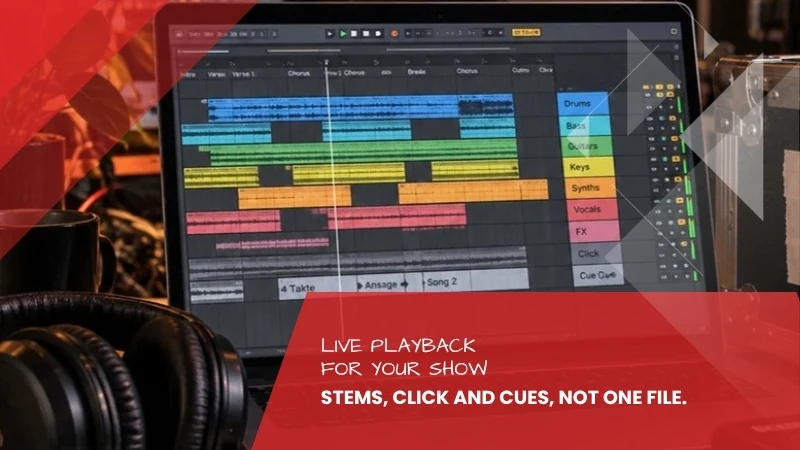
Playing a stereo file from a laptop goes wrong on every stage as soon as something does not follow the plan. From your material I build a session that holds up: separate tracks so the sound engineer can step in, a click track in your ear, spoken markers exactly where you need them, and a structure you can navigate even under pressure.
A good fit if: You perform with playback, alone or with a band, and you do not want to depend on everything running exactly as it did in rehearsal.
What makes a stage session
On stage what counts is not how good the mix sounded in the studio, but whether it can be adjusted. That is why you get the tracks separately: the engineer can lift the kick drum when the room swallows it and pull back the strings when they cover the vocals. The click track runs on its own output, audible only to you. On top of that come spoken markers before entries and time changes, so you know where you are even when the audience is louder than the monitor.
What you get
- Stems of your songs, grouped sensibly instead of simply numbered
- Click track on its own track, with a count-in before every song
- Cue track with spoken markers before entries and changes
- A named, ordered session for Ableton Live or as a folder structure
- One stereo mixdown per song as a fallback if the tech fails
How it works
- Send your material: You send your songs as stems or as a mix, along with the setlist and the running order.
- Work through the show: We go through the performance: where you need a count-in, where a marker, which songs run into each other, where there is a break.
- Build: I build the session, place click and cues, group the tracks and name everything so that an unfamiliar engineer understands it.
- Run-through: You get the session and try it out. Whatever does not sit, I adjust.
- Delivery: Finished session, stems, click, cues and mixdowns within 7 working days.
Important note: This service prepares existing material for the stage. It does not produce new music. If you have no accompaniment yet, you need the custom backing trackfirst; the two together are a sensible path. If the individual tracks are missing because only the finished mix survived, the stem separationhelps. And if it is about the sound of your recording rather than the show, mixing and mastering is the right choice. I do not remix the playbacks here, I order and extend them for the stage.
Frequently asked questions about live playback
Do I need Ableton Live for this?
No. You get the session for Ableton Live because it needs the least setup there, but in addition every track as an ordered WAV file. That works in any other software and even with a simple multitrack player.
How does the click reach only my ear?
The click track sits on its own track with its own output. Your interface or the mixing desk sends that output to your in-ear or headphones, everything else goes to the PA. I write down how to set this up with your specific gear.
What exactly are cues?
Short spoken notes on a separate track that only you hear: “four bars to chorus”, “verse two”, “last time”. Especially useful when you speak between songs or play an instrument alongside.
How many songs does the price cover?
The base price covers up to five songs. For a longer set, tell me how many, and I will work it out in advance instead of surprising you afterwards.
Can I swap songs later?
Yes. The session is built so that single songs can be removed and replaced. If I do it for you, it is a small follow-up job.
What happens if the tech fails on stage?
That is what the stereo mixdown per song is for. It plays from any device, even a phone. Not the elegant solution, but it has saved evenings before.
Go on stage with a session, not a file
Stems, click track, cues and an ordered session, plus a mixdown as a fallback. Built around your running order, entirely remote.